
Most travellers picture a hacker as a distant, abstract threat: something that happens to other people's inboxes. In 2026, it's closer than that. It's sitting two rows behind you with a device the size of a paperback, or it's the network your phone joined automatically before you'd even found your gate.
The attack has a name: the evil twin, and it has quietly become one of the most common ways travellers lose money and identity data at airports and in the air. In August 2026, a passenger allegedly broadcast a fake "Delta WiFi Fast" network mid-flight on a domestic US route, grounding the real onboard Wi-Fi for half an hour while a spoofed login page reportedly harvested credentials from anyone who connected. It is exactly the kind of incident that is becoming less rare, not more.
What is an "evil twin" Wi-Fi attack?
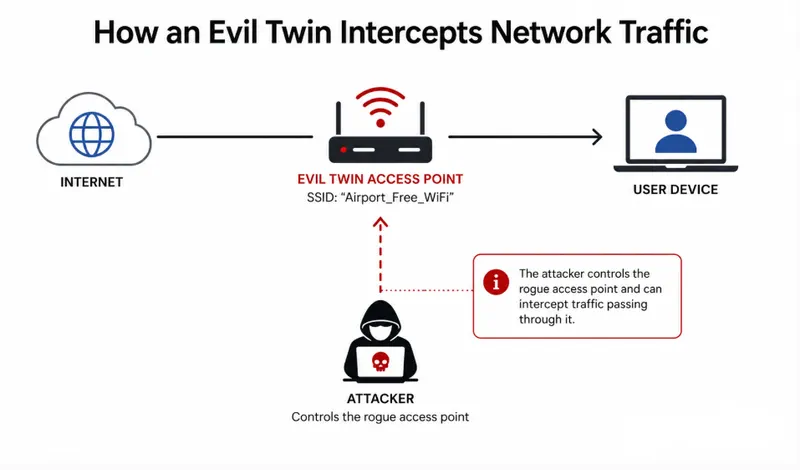
An evil twin is a rogue hotspot built to look almost identical to a real one: "Airport_Free_WiFi" instead of "Airport Free WiFi," or sometimes a name copied outright. Your phone can't reliably tell the difference, and because it is built to auto-join the strongest familiar signal, it often connects before you have even glanced at the network list.
How an evil twin actually works
It takes three simple steps, none of which require much skill or expensive equipment.
- A stronger signal wins. A cheap rogue access point, sometimes a handheld device costing less than a nice dinner, broadcasts a louder version of a trusted network name, and nearby phones prefer it automatically.
- Your traffic passes through the attacker first. Most web browsing is still protected by HTTPS, so page content usually stays encrypted. But DNS lookups revealing which sites you visit, and any app still using plain HTTP, are exposed.
- The login page is the real trap. Whatever you type into a fake captive portal or a "verify your booking" page goes straight to the attacker's own server: encryption never enters into it, because you handed the data over directly.
A case that ended in seven years behind bars
This isn't a theoretical risk. In one prosecuted case, a man ran evil twin networks across airports and domestic flights in Perth, Melbourne and Adelaide, harvesting login credentials from travellers at each stop. It took investigators over a year to build the case; he was sentenced to more than seven years in prison. A separate UK data breach this year exposed information tied to 8.7 million airport customers, including in-terminal Wi-Fi registrations and booking details.
Evil twin phishing doesn't need a click, a download, or a moment of carelessness. It only needs you to join the wrong network: a decision most people make without thinking twice.
The other front door: your inbox
Wi-Fi spoofing gets the headlines, but the older trick still works just as well. Airline fraud teams have been warning about it for over a decade: an email arrives thanking you for your purchase, quotes a real-looking booking reference and card charge, and asks you to click through to "view your ticket" or "verify your details."
Between September and December 2025 alone, researchers tracked close to 1,800 suspicious domains built around more than 35 global airline brands, alongside thousands more using generic terms like "flight," "airfare" and "charter" to widen the net. The goal is almost always the same: harvest card details, loyalty logins, or push a fake "boarding pass" app that is actually malware.
One airline's own advice, after years of fielding these reports, still holds: a legitimate airline will never link you straight into an internet banking sign-on page, and will never ask for card details through an email link outside of a refund or change you initiated yourself.
It is exactly this reaction (genuine, mild panic) that a good phishing simulation is supposed to produce, safely, before the real version turns up in your inbox on holiday.
What to actually do about it
The good news is that neither threat requires anything technical to defend against, just a couple of habits that become automatic after the first trip.
If you fly often
- Carry your own connection. A personal hotspot or travel eSIM should be your default: public Wi-Fi becomes the backup, not the first choice.
- Keep a VPN running automatically the moment you connect to any shared network, on the ground or in the air.
- Turn off Wi-Fi auto-join for open networks in your device settings, so nothing connects silently before you've checked the name.
- Use an authenticator app or hardware key for loyalty and banking logins instead of SMS codes, which can be intercepted on a compromised network.
- Confirm the exact network name with staff before joining: evil twins live in the one-character difference most people never look for.
If you travel occasionally
- Never enter a card number, bank login, or loyalty password on a Wi-Fi splash page. A real captive portal never needs it.
- Go to the airline's app or official site directly for any "your booking is confirmed" email; don't click through from the message itself.
- Keep your original booking reference somewhere safe, and treat any "urgent" follow-up email as suspicious until you've checked it against that reference independently.
- If a ticket or itinerary arrives as a downloadable attachment you weren't expecting, don't open it. Go to the airline's site and log in there instead.
- When in doubt about a network or an email, ask airport or airline staff directly rather than guessing.
The half-second habit that beats most of this
None of this requires paranoia at 35,000 feet. It requires the same instinct you already use at a hotel or a cash machine: a half-second pause before you trust the thing in front of you. That pause is, by a wide margin, the cheapest security software available.
It's also part of why we stay involved after booking. If something about a "confirmation" email or an in-app message doesn't sit right, get in touch and we'll tell you straight away whether it's really from us, your airline, or your hotel, and it's worth having travel insurance in place that covers more than just lost luggage. If you're planning your next trip and want a consultant keeping an eye on the details, get a quote and let's talk it through.
Frequently asked questions
What is an "evil twin" Wi-Fi attack?
An evil twin is a fake wireless network set up to closely mimic a real, trusted one, often at an airport, hotel, or on board a flight, using a nearly identical name. Devices that auto-join familiar networks can connect to it without any warning, after which the attacker can see unencrypted traffic and intercept anything typed into a fake login page.
How can I tell if airport or hotel Wi-Fi is fake?
Look closely at the exact spelling and formatting of the network name, and confirm it with staff at the counter or front desk rather than trusting your phone's suggested network alone. Multiple networks with very similar names, or a splash page that asks for a card number, passport details, or a banking password, are both strong warning signs.
Is it safe to use public airport or hotel Wi-Fi at all?
It's reasonably safe for casual browsing if you run a VPN and never enter sensitive credentials into a splash page. For anything involving banking, loyalty accounts, or personal data, a personal hotspot or travel eSIM is the safer default, with public Wi-Fi kept as a backup only.
Does a VPN protect me from evil twin attacks?
A VPN encrypts your traffic once you're connected, which stops an attacker on the same network from easily reading what you send and receive. It does not stop you from joining the fake network in the first place, so it works best alongside the habits above, not instead of them.
What should I do if I think I've already connected to a fake network?
Disconnect immediately, change the passwords for any account you accessed while connected, enable two-factor authentication where you haven't already, and monitor your bank and loyalty accounts closely for the following weeks. If you entered card details on a suspicious page, contact your bank straight away to flag possible fraud.
Are "your booking is confirmed" emails from airlines safe to click?
Treat them with caution. Go to the airline's official app or website directly and check your booking there rather than clicking a link in the email. Legitimate airlines will never send you straight into an internet banking sign-on page or ask for card details by email outside of a refund or change you initiated yourself.
Planning a Travel Safety trip?
Traville Travel arranges Travel Safety holidays personally, from flights to the finer details. Tell us what you have in mind and we will build a tailor-made quote, no obligation.


